Your whole PC
Spotify and other music apps, video players and Discord. One portable .exe in your tray. In a browser it can't always tell a music tab from a video tab: the extension fixes that.

Pauses music when videos play. And brings it right back.
Autopauser sits quietly in your system tray, or in your browser's toolbar. When a video begins, your music fades out and pauses. When the video pauses, it waits a moment, then fades your music back in.
Autopauser comes as a Windows app and as a browser extension. Each one works on its own, and they get even better together.
Spotify and other music apps, video players and Discord. One portable .exe in your tray. In a browser it can't always tell a music tab from a video tab: the extension fixes that.
No app needed. Music on YouTube Music, Spotify Web, SoundCloud and more pauses while a video plays in another tab. It only sees your browser, though: desktop apps like Spotify need the app.
The app takes the lead and the extension tells it exactly which tab is music and which is video. Start or close either one and they hand over by themselves.
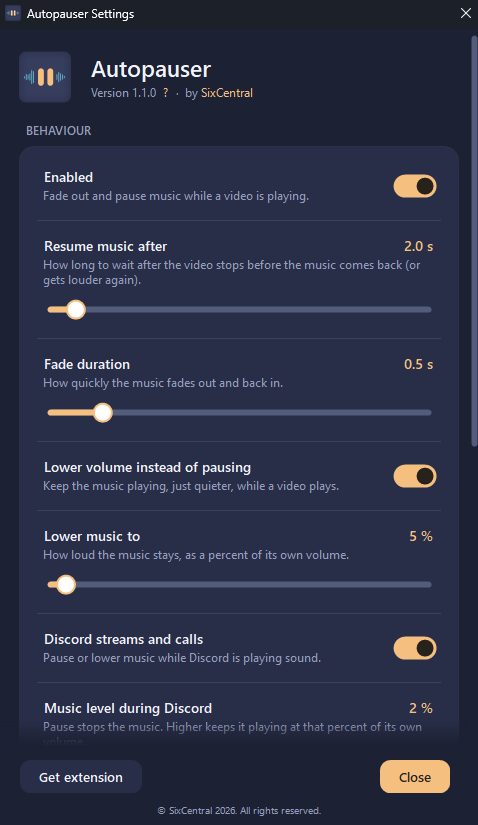
Fade the music out and pause it, or just turn it down. Choose how long the fade takes and how long to wait before the music comes back. The app and the extension have the same settings, and the app can also start with Windows and pause for Discord calls and streams.
Autopauser is free. If it saves you reaching for the volume key, you can buy me a coffee.
Buy me a coffee